
Get your time back. AI does the work.
Write tasks on a board. An AI agent works through them, project by project, in isolated containers, streaming its output live back to your board. Use your own Claude, OpenAI, Gemini or Grok API key, or a model running on your own hardware.
Download for desktop Create free accountFree desktop app. Your own API key, or your own hardware.
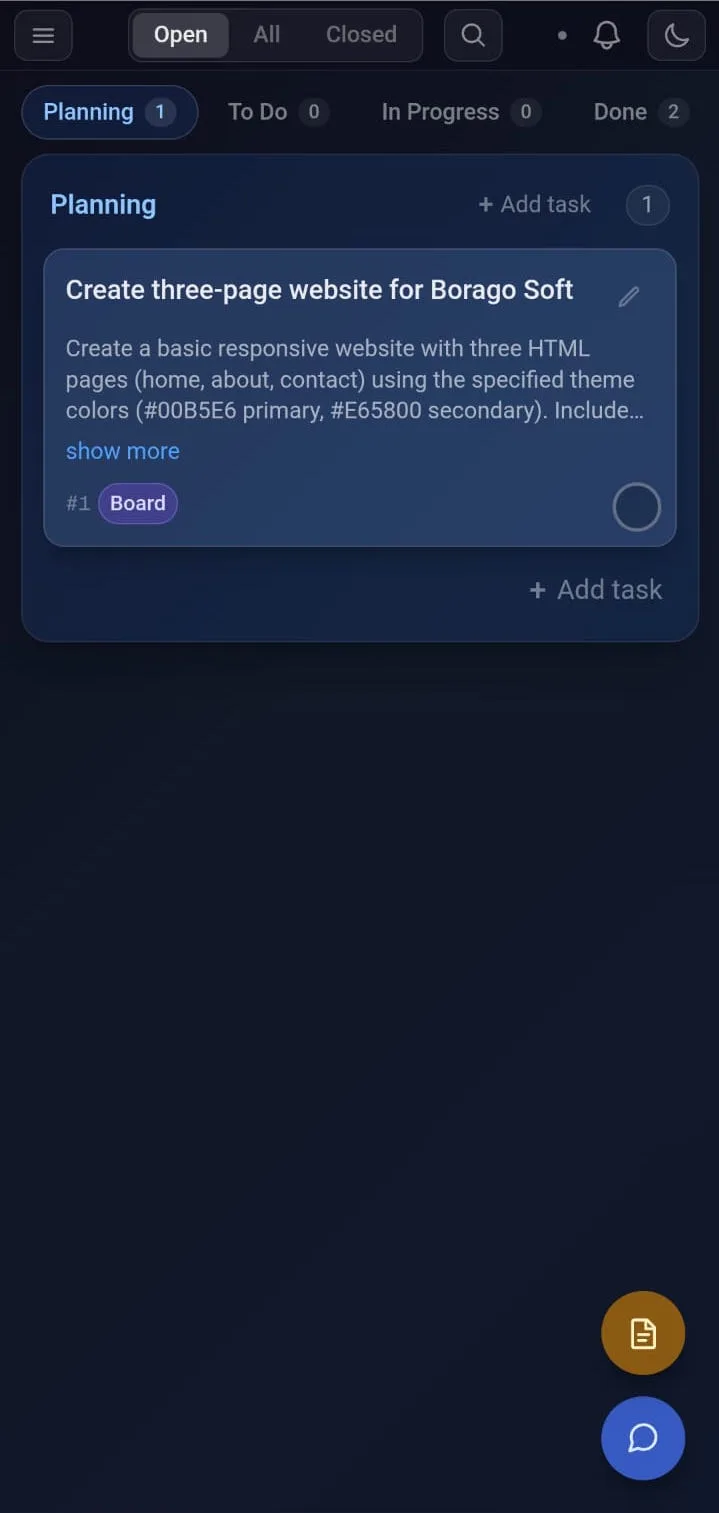
Works from your phone
Sign in on your phone and the same board is there. Read what the agent did, answer its question, move a card to To Do, and your desktop runs it.
Columns become pages you swipe between. Cloud sync is a paid plan with a free 30-day trial, and the desktop app stays free.
What works from a browser or phoneHow it works
Create a project
Point it at a repository or start fresh. The project gets its own container with the tools it needs.
Write tasks
Describe what you want done, in plain language, as cards on a Kanban board.
The agent gets to work
It picks up the queue, executes each task, streams the output live, and asks you when it needs a decision.
Why Borago Board
Local-first
Your board lives in a local database on your machine. No account required. Without cloud sync the app sends your work only to the AI provider you chose and your git remote.
Your own API key
Claude, OpenAI, Gemini or Grok, on your own API key. Usage is billed to you by your provider directly. No middleman, no markup. Every provider
Or your own hardware
Run tasks on a local model instead - Ollama, vLLM or LM Studio, on this machine or another one on your network. No API key, nothing sent to a provider, no cost per task. Using a local AI model
Isolated containers
Each project gets its own Docker container. The agent works inside it, so your host system, beyond the project folder you point it at, stays out of reach. Containers keep running after you quit the app, until you stop them. How it is secured
Cloud, when you want it
Keep the board on your desk, or sync it to the cloud and run your projects from a browser or phone - start a container, open a terminal, plan the next task. The work still happens on your own machine. Off by default. What works from a browser or phone
Get Borago Board
Available for Linux, Windows and macOS. The desktop app is free. Cloud sync for your browser and phone is a paid plan with a free 30-day trial. Your AI provider bills you directly.
DownloadHow it compares to chat workspaces, workflow builders and other agent boards
Weighing it up with an AI assistant?