
Home / Docs / User guides
Recovering things
How to get back a closed task, a deleted project, a board damaged by an update, a lost credential or an unsaved comment, and what an uninstall leaves behind.
Almost nothing on a Borago Board board is destroyed by one click. A task is closed, never deleted. A deleted project sits in a recycle bin. A copy of the whole board is taken before an update may touch it. A credential that vanishes is held, and its last 10 values are journaled. This guide is the way back for each, in the order you are most likely to need them.
Goal
Find the thing you lost, and put it back.
Before you start
- The desktop app, for restore points and the secret journal, which live only on the machine that holds the board.
- For a project in the recycle bin, any surface works, since deletions sync.
Steps
- Bring back a closed task. Tasks are never deleted. A card dragged onto the Close Task target that appears at the right edge while dragging, or moved to Close on the phone's drag rail, is closed and leaves the board with its status unchanged. To see closed tasks, switch the board's visibility control from Open to Closed, or to All to see both, in the board's filter bar. Open the task. It carries an Archived pill and a Reopen task button, which puts it back on the board in the column it was in. A task in Done, Blocked or Canceled is not closed, only finished, and moving its card to another column is enough.
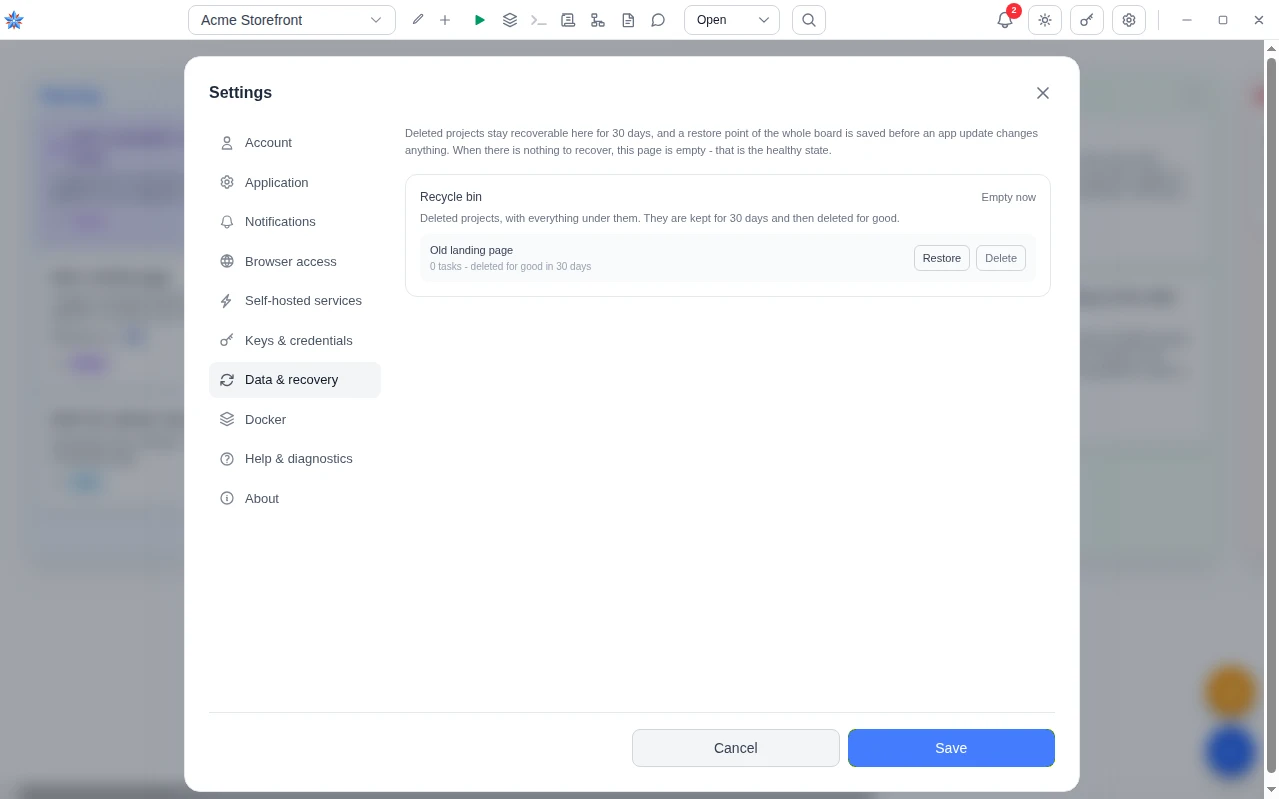
- Restore a deleted project from the recycle bin. A project is deleted from the project dialog's Delete project button, behind a confirmation that has you type the project's name and says it goes to the recycle bin and stops the container. It stays there for 30 days. Open Settings, then Data & recovery. Recycle bin lists each deleted project with its task count and the time left. Press Restore. The project, the tasks that were deleted with it, and their comments and attachments come back, and a dialog offers Switch to it. A task that was already in the bin before its project was deleted does not come back. When a live project has taken the same name, the restored one is renamed with (restored) after it, and its container name follows, because two projects cannot share one folder. The container was stopped at the delete, so start it again from the board. This works from the desktop app, a browser and the phone, since the deletion and the restore both sync. Delete on a row, or Empty now for the whole bin, destroys for good behind two confirmations, and on the desktop also removes that project's containers, volumes, networks and images.
- Roll the whole board back after a bad update. Before a new version is allowed to change the database, the desktop copies the board file. It does so when a database upgrade is pending and when the app's version has changed, and never for an empty board. The last 2 are kept, and older ones are removed by themselves. Open Settings, then Data & recovery. Restore points lists each copy with why it was taken, such as Saved before updating or Saved before a database upgrade with the version, its time and its size. Press Restore. The dialog Restore this copy of your board? warns that everything created since will be gone and that the current board is saved first. Press Restart and restore. The restore is applied at the next start, never while the board is open, so the app restarts itself to do it. Until then the section shows A restore is queued and will be applied the next time the app starts with Cancel it. The board you had is kept as a point named Saved before you restored an earlier copy, so the rollback itself can be undone. The secret journal is copied beside each point. These are local files on this computer, not cloud backups, and the cloud holds the live data and offers no earlier copy to restore. Delete on a point frees its space and cannot be undone. From a browser on the local network the restore can be queued but the desktop has to be restarted by hand. The cloud browser and the phone have no restore points.
- Put back a credential that vanished. There are two places, for two causes. When a change synced from another device removed a git key, an API token or the variable set, the old value is held on this machine for 7 days by default. The bell shows a notice naming the project and the credential with Restore and Delete permanently on it, and Settings, then Keys & credentials, lists the same under Removed credentials, still recoverable. Press Restore and the value is back and synced. For every other cause, including your own overwrite, the desktop journals every value each secret field has held, the last 10 per field. Open the project dialog with Edit project. In the Environment Variables tab, under All variables in this project, and in the Project Info tab under the git key, a row says how many earlier values are kept on this device. Press Show, find the entry by its time and its preview, and press Restore. The value becomes the current one, encrypted under the key in use now, and syncs. A journal entry stored under a key this device no longer has cannot be restored and its button says so. See Secrets and environment variables.
- Keep an unsaved comment or edit. Closing the task dialog with a typed comment or an edited task, by the ×, Close, Escape or a click outside, raises Unsaved changes with three buttons. Keep editing returns to the dialog, which is also what Escape does. Save and close saves and then closes. Discard closes and loses the text. The two links to a parent or child task also go through the same prompt before navigating. A save that fails keeps the dialog open rather than closing over text it could not store. The planning chat needs no prompt. Its draft is written to this browser as you type, so closing the chat panel and opening it again brings the draft and the conversation back.
- Know what an uninstall leaves. Removing the app removes the app and nothing else. Your boards and database, the secret journal, the restore points, every project's Docker files and workspace, Docker, gVisor and every container, image, volume and network stay on the machine until you delete them yourself, and reinstalling picks them all up again. Where they are on each operating system, and how to remove the Docker side, is on the uninstall page. The tidy way to be rid of a project's containers and images is to delete the project and then destroy it from the recycle bin before uninstalling.
If it did not work
- The project is not in the recycle bin. More than 30 days have passed, or it was destroyed from the bin, and it is gone from every device. Check a restore point on the desktop from before the delete. Restoring one replaces the whole board with that copy, so read its date first.
- Restore points is empty. The section renders nothing on a fresh install, on the cloud browser and the phone, and after the points have been deleted. An update that changed nothing in the database still takes one. Points are taken by the desktop only, on the computer that holds the board.
- The restored credential vanished again. The other device may still hold a newer removal. Restore it once more on the machine that ran the tasks and leave both devices connected until the status in Settings, then Account, reads Connected. Then check the other device's project dialog shows the value as stored.
Related: Secrets and environment variables, Restore a deleted project and roll back an upgrade, Recovery, Cloud sync, browser and phone, Uninstalling